
W03 · AI agents · n8n + OpenAI
AI Inbox Triage & Auto-Draft Replies with n8n and OpenAI
AI inbox triage uses a language model to read each incoming email, label it by category and urgency, and route it to the right person with a reply already drafted. This build runs on n8n with OpenAI, Gmail, Slack and Google Sheets.
- For
- Support and operations teams
- Built in
- n8n + OpenAI
- Stages
- 3 stages, 10 nodes
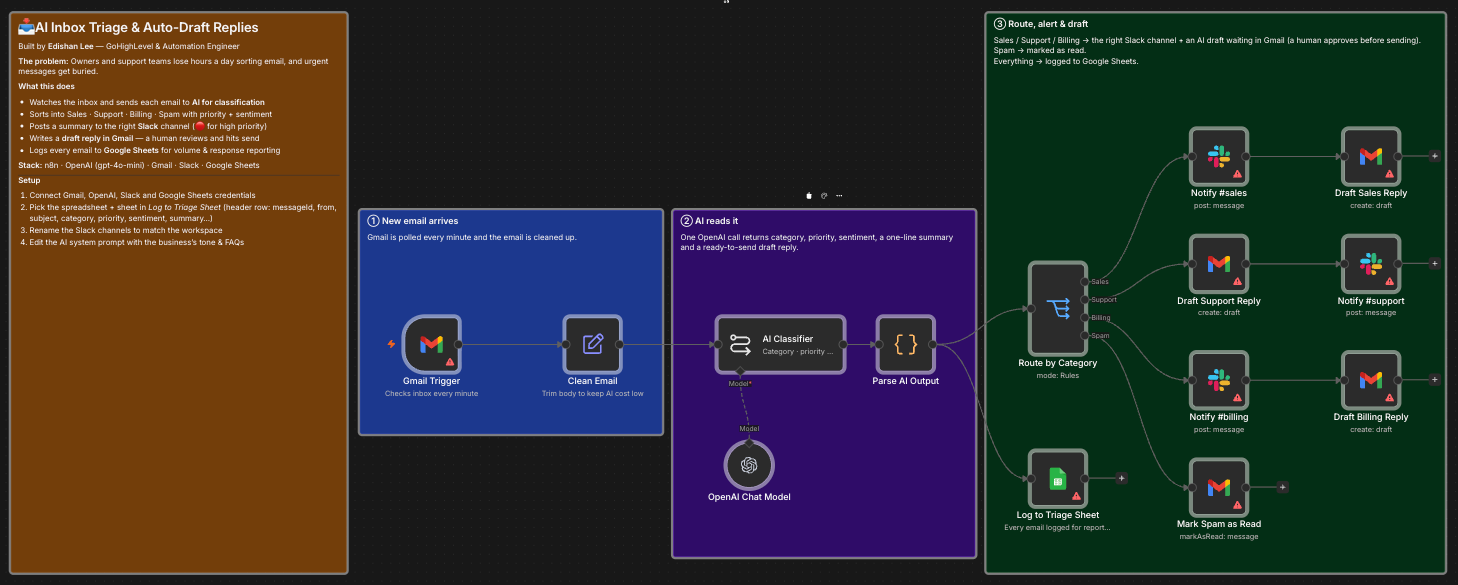 Open full size ↗ (opens the workflow screenshot in a new tab)
01The problem
Owners and support teams lose hours sorting email, and urgent messages get buried under everything else.
02How it works
- 01
A new email arrives
Gmail is checked every minute, and each email is cleaned up and trimmed to keep model costs low.
- Gmail Trigger
- Clean Email
- 02
AI reads it
One OpenAI call returns the category, priority, sentiment, a one-line summary and a ready-to-send draft reply.
- AI Classifier
- OpenAI Chat Model
- Parse AI Output
- 03
Route, alert and draft
Sales, Support and Billing emails post a summary to the right Slack channel and leave a draft reply in Gmail. High-priority emails are flagged. Spam is marked as read. Every email is logged to Google Sheets.
- Route by Category
- Notify #sales / #support / #billing
- Draft Reply
- Mark Spam as Read
- Log to Triage Sheet
03Built to fail safely
- Drafts only: a human reviews and sends every reply
- One model call per email on gpt-4o-mini, with bodies trimmed, to keep costs predictable
- Every email is logged, so volume and response can be reported on
Outcome. Nobody sorts the inbox by hand, and every message has an owner and a draft ready to send.
04Stack
- n8n
- OpenAI
- Gmail
- Slack
- Google Sheets
FAQ
Questions about this workflow.
01Does the AI send replies on its own?
No. Drafts wait in Gmail and a person reviews and sends them.
02What does it cost to run?
It makes one OpenAI call per email using gpt-4o-mini, and trims each email first to keep model costs low.
03Can the categories match my business?
Yes. The Slack channels and the AI's instructions, including your tone and FAQs, are configured per business.
Next step
Want this workflow in your business?
Tell me how leads, bookings and follow-ups work today. I'll map where this workflow fits, what it connects to, and what it should be measured by.