
W06 · Reputation · n8n + GoHighLevel
Review Generation & Reputation Protection for GoHighLevel
A review generation workflow asks customers for a rating after their visit, makes it easy for satisfied customers to post a Google review, and alerts the owner straight away when someone has a bad experience.
- For
- Local service businesses
- Built in
- n8n + GoHighLevel
- Stages
- 5 stages, 17 nodes
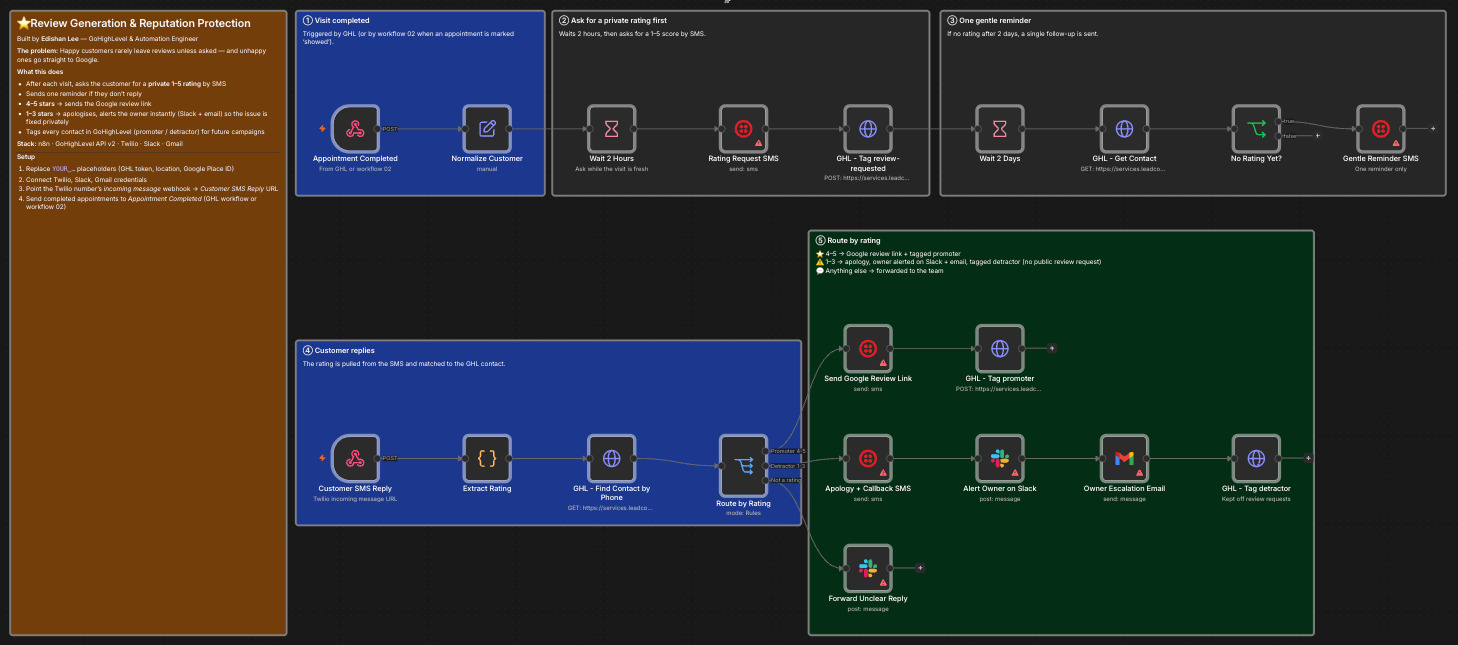 Open full size ↗ (opens the workflow screenshot in a new tab)
01The problem
Happy customers rarely leave reviews unless asked, while unhappy customers often go straight to Google.
02How it works
- 01
Visit completed
Triggered by GoHighLevel, or by the speed-to-lead workflow, when an appointment is marked as showed.
- Appointment Completed
- Normalize Customer
- 02
Ask for a private rating first
Two hours after the visit, the customer is asked for a 1–5 score by SMS and tagged as review-requested.
- Wait 2 Hours
- Rating Request SMS
- Tag review-requested
- 03
One gentle reminder
If there's no rating after two days, a single follow-up is sent.
- Wait 2 Days
- GHL Get Contact
- No Rating Yet?
- Gentle Reminder SMS
- 04
The customer replies
The rating is read from the SMS reply and matched to the GoHighLevel contact by phone number.
- Customer SMS Reply
- Extract Rating
- GHL Find Contact by Phone
- 05
Route by rating
A 4–5 gets the Google review link and is tagged as a promoter. A 1–3 gets an apology and callback offer, the owner is alerted on Slack and by email, and the contact is tagged as a detractor. Unclear replies are forwarded to the team.
- Route by Rating
- Send Google Review Link
- Apology + Callback SMS
- Alert Owner
- Forward Unclear Reply
03Built to fail safely
- Only one reminder is ever sent
- Unclear replies go to a person instead of being guessed at
- Low scores reach the owner immediately, with time to make it right
Outcome. More public reviews from happy customers, and problems reach the owner before they reach Google.
04Stack
- n8n
- GoHighLevel
- Twilio
- Slack
- Gmail
FAQ
Questions about this workflow.
01When is the rating request sent?
Two hours after the appointment is marked as showed in GoHighLevel.
02What happens with a low rating?
The customer gets an apology and a callback offer, and the owner is alerted on Slack and by email straight away.
03How many messages does a customer get?
The rating request and at most one reminder.
Next step
Want this workflow in your business?
Tell me how leads, bookings and follow-ups work today. I'll map where this workflow fits, what it connects to, and what it should be measured by.